
In today’s digital age, music streaming platforms like Spotify have revolutionized how we discover and enjoy music. With vast libraries at our fingertips, we’ve created personalized soundtracks for every moment of our lives. However, what happens when you want to take your favorite playlist on a hike with no internet, save it for a long flight, or simply store it on a device that doesn’t support the Spotify app? The platform’s restrictions can feel limiting. This is where the power of downloading Spotify music as universal MP3 files becomes a game-changer. If you’re looking for a reliable, efficient, and high-quality solution, ViWizard Spotify Music Converter stands out as the premier tool for the task.
Table of Contents
Why Convert Spotify Music to MP3?
First, let’s address the “why.” Spotify, in its standard Premium tier, allows offline listening, but these downloads are encrypted and locked within the app. You cannot transfer them to a USB drive, burn a CD, or play them on non-Spotify devices like an MP3 player or standard music library software. Converting songs to MP3 breaks these digital locks, giving you true ownership and freedom. You can:
- Listen Anywhere, Anytime: Enjoy your music on any device—car stereo, old-school iPod, or smartwatch—without needing the Spotify app or an internet connection.
- Create Permanent Backups: Safeguard your curated playlists against songs being removed from Spotify’s catalog.
- Save on Data: Stop using mobile data for repeated streaming.
- Edit and Remix: Use the audio files in your own creative projects.
Introducing Your Solution: ViWizard Spotify Music Converter
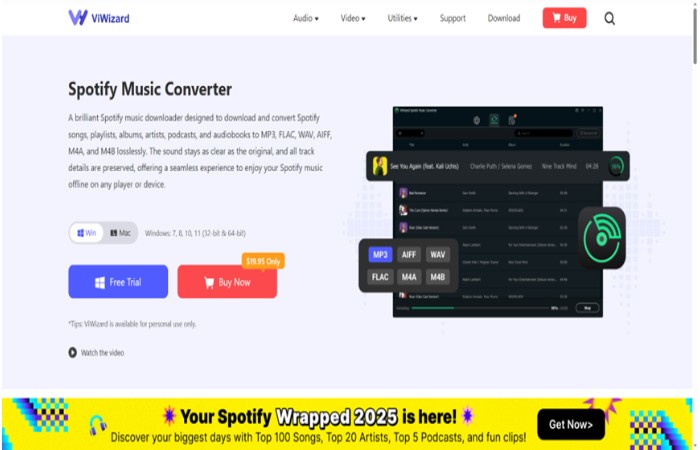
ViWizard Spotify Music Converter (one of the best downloader of Spotify) is a sophisticated desktop software designed specifically to overcome Spotify’s DRM (Digital Rights Management) protection. It works seamlessly to download any track, album, playlist, or podcast from Spotify and convert it into a variety of common formats, including MP3, AIFF, FLAC, WAV, M4A, and M4B. The process retains the original audio quality and preserves all vital ID3 tags (like title, artist, album, and cover art), so your music library stays perfectly organized.
How to Download Spotify Music to MP3 with ViWizard: A Simple Walkthrough
The beauty of ViWizard lies in its user-friendly process. Here’s how you can build your permanent music collection in just a few steps:
Step 1: Download and Install
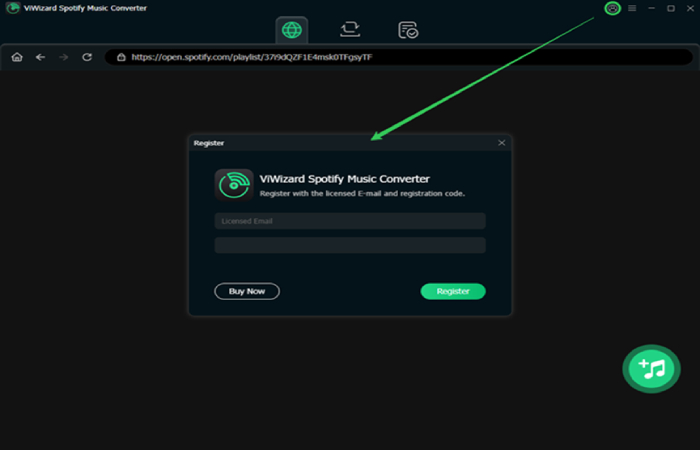
Visit the official ViWizard website, download the converter for your Mac or Windows computer, and follow the straightforward installation instructions. Launch the program afterward.
Step 2: Add Spotify Music to ViWizard
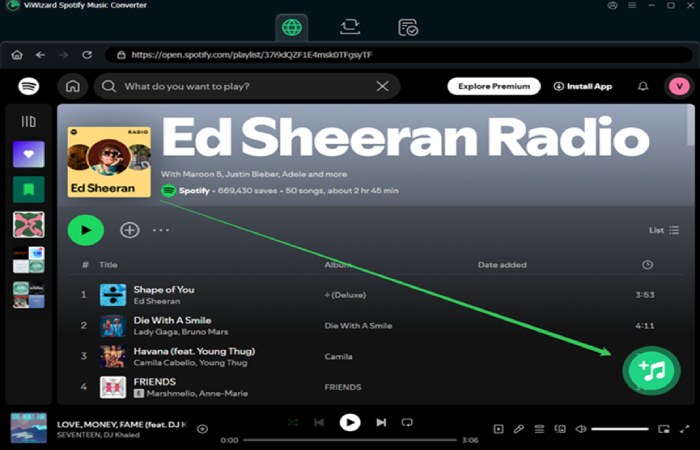
ViWizard has a built-in music downloader and converter and you only need log in your Spotify account in the built-in Spotify web player. After select the songs you want to download, you can simply copy and paste the link of your desired Spotify song, playlist, or album directly into ViWizard’s “Add Files” interface. Alternatively, you can use the button of add to import Spotify songs to ViWizard.
Step 3: Customize Your Output Settings (Optional but Recommended)
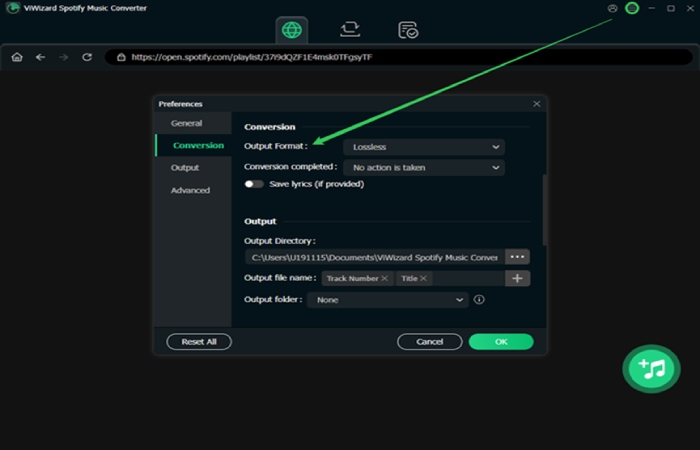
Before conversion, click the menu to access the settings panel. Here, you can:
- Choose MP3 as your output format.
- Select the audio quality (up to 320 kbps for crystal-clear MP3s).
- Adjust the sample rate and channel.
- Set an organized output folder structure.
This customization ensures your final files meet your exact specifications for quality and organization.
Step 4: Convert and Download
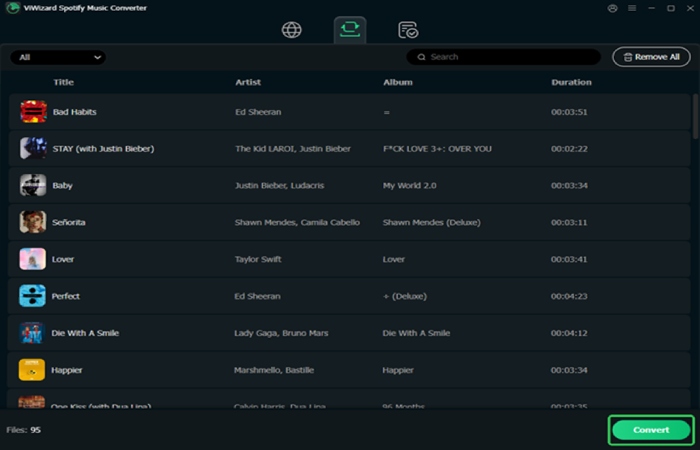
With your settings perfected, hit the “Convert” button. ViWizard will now download and convert the Spotify music at an impressive speed. You can watch the progress in real-time.
Step 5: Find Your Universal MP3 Files
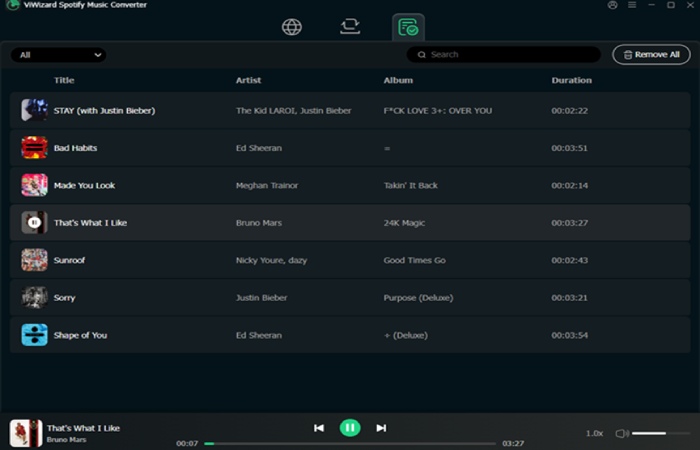
Once completed, click “Converted” to open the output folder and now, the tracks added of Spotify are downloaded to your computer. You’ll find all your Spotify songs now as standalone, high-quality MP3 files, ready to be transferred to any device or imported into any media player like iTunes, Windows Media Player, or VLC.
Why Choose ViWizard Over Other Methods?
While browser extensions or online “stream rippers” might seem tempting, they often come with severe drawbacks: compromised audio quality, missing metadata, slow speeds, daily limits, and significant security risks. ViWizard offers a professional, all-in-one solution:
Lossless Quality: It records the audio at up to 320 kbps, preserving the original listening experience.
Blazing Speed: Convert songs up to 15X faster than average playback time.
Batch Processing: Download entire playlists or discographies in one go.
Offline Conversion: Once added, you can convert music offline at any time.
Safety and Privacy: As a reputable desktop software, it operates locally on your computer, keeping your data and Spotify account safe—no risky online portals.
Conclusion: Take Control of Your Music
Don’t let streaming restrictions dictate how and where you enjoy your favorite tunes. Converting Spotify music to MP3 empowers you with true, flexible ownership of your audio collection. ViWizard Spotify Music Converter provides the most reliable, high-fidelity, and effortless path to achieving this freedom.
Ready to liberate your playlists? Explore the full potential of ViWizard today and transform your streaming experience into a lasting personal library. Your music, your rules—now permanently in MP3.