

In the world of work, a PDF isn’t a static document. It’s an editable, reviewable, and executable document. A supplier proposal is something to be analyzed before it’s edited; a report needs to be made searchable before it’s annotated.
UPDF 3.0 closes the gap between artificial intelligence and everyday document management. Positioned as an all-in-one AI document editor, UPDF 3.0 provides tools for comprehension and the rest for the job. With the integration of AI and editing tools, annotating and converting capabilities, and OCR and signing functionalities, this version revolutionizes how users interact with their files.
This article provides a complete review of UPDF 3.0. It illustrates the connected ecosystem of this software that helps users easily switch between understanding and completing a document.
Table of Contents
The Core Philosophy of UPDF 3.0
There is usually uncertainty at the beginning of a document task. A manager or professional needs to identify various deliverables quickly when facing a lengthy report. It may be determining the sections they need to understand, or fulfilling the conditions attached to a recommendation.
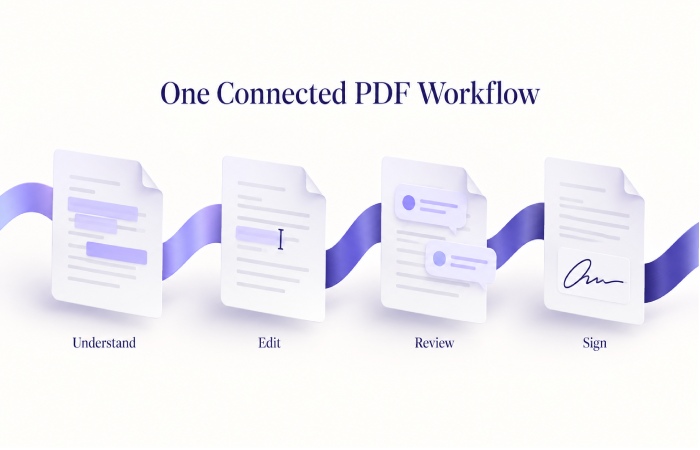
UPDF 3.0 arranged its capabilities according to a four-step process: Understand, Edit, Review and Sign. The core philosophy of UPDF 3.0 is that a summary alone does not complete a document review. A user must verify the original wording, revise a figure, add a comment and/or prepare the final pages.
The PDF editor remains the focal point of the process and the integrated AI provides an easy means to get to the content. Frictionless interaction is the key focus here.
Understanding Documents with UPDF 3.0 AI
To begin any task, one must first understand the documentation related to the task at hand. With the power of AI assistants UPDF 3.0 offers its users the ability to analyze documents and break down information in a variety of ways, including asking questions, summarizing, translating and simplifying answers.
Creating a Focused Reading Agenda
Let’s say a project manager is reviewing a complex supplier proposal and needs to understand the proposed deliverables. They can prompt UPDF 3.0’s AI to summarize the deliverables and payment terms in the proposal, and have the AI highlight areas that require more explanation. The project manager can then efficiently review the relevant sections and identify areas that are still unclear.
Verifying and Translating Source Content
Because a summary may omit an exception, key contractual elements, or financial or date-related information, it is important to verify them in the original content. The AI capabilities of UPDF 3.0 are particularly helpful in understanding documents in other languages, as the AI can instantly translate and explain the content.
Everyday PDF Editing and Review in UPDF 3.0
Once a document has been analyzed and understood, it may need to be edited. UPDF 3.0 offers a number of features to edit a document directly, including annotating, marking and highlighting text.
Direct Editing and Annotation
Users can effortlessly modify text and images, mark critical passages, and record detailed review notes. If a delivery date needs correction or a paragraph requires a colleague’s input, the editing and annotation features within UPDF 3.0 handle it seamlessly.
OCR and Page Management
UPDF 3.0 utilizes OCR (Optical Character Recognition) on image based pages to extract the text. This allows UPDF 3.0 to convert the document to an editable and searchable format, and gives the user the ability to organize the document pages.
Specialized AI Assistants in UPDF 3.0
In addition to comprehension of general documents, UPDF 3.0 includes specialized AI assistants for Contracts, Finance, Academy, and Resume.
Contract Analysis
A combination of legal and business professionals report the Contract assistant in UPDF 3.0 helps organize questions concerning the definition and use of key terms and wording issues. One example is, “Please explain renewal provisions,” or “Tell me about termination conditions.” The AI output helps the reviewer structure their comments; however, the output does not answer the question or take the place of legal judgment.
Financial Report Breakdown
When reviewing financial reports, the Finance assistant can be of great assistance in identifying areas showing a material change, as well as performance aspects requiring a closer review. By asking AI to summarize various line items of the income statement and cash flow statement, reviewers can quickly process data and check their work against the reporting period, unit, and monetary amounts shown in the underlying reports.
Completing Your Workflow: Signing and Automation

UPDF 3.0 contains signing tools to assist users in completing signature tasks to finalize agreements. Also, as not every task requires deep interpretation, some may involve repetitive, mundane, and labor-intensive operations. Batch processing is available, and automated AI agents are recommended for more complicated processes. Given the advanced nature of these automated tools, quality may vary. Users are encouraged to process a representative example first, reviewing formatting and page order, to confirm text has been recognized appropriately, before using them to process a large volume of documents.
Final Thoughts on UPDF 3.0
UPDF 3.0 is a major advancement in PDF management. Bringing its brand promise into the user’s familiar work sequence of understanding, change, review and complete, eliminates the friction between separate disconnected tools. The assistance of AI in the analysis phase and the robust PDF toolkit in the action phase, completes the user’s experience in UPDF 3.0.
With full version availability across Windows, Mac, iOS and Android devices, and the web for the AI features, UPDF 3.0 provides a connected approach to document workflows. For professionals wanting to integrate a unified solution, examining UPDF 3.0’s current product offerings would be a worthwhile endeavor to consider the possibilities for enhancing their intelligent and productive workflows.